

etsy integration Setup
Variation Stock Sync!
Variation stock sync is possible, but limited to a very small number of variations per listing.
If you have a large amount of listings with a large amount of variations per listing then stock sync will fail due to usage allowances on the Etsy API.
Create App
To setup the Etsy integration with Mintsoft, you will first need to create an APP.
https://www.etsy.com/developers/your-apps
Complete the form as per below:
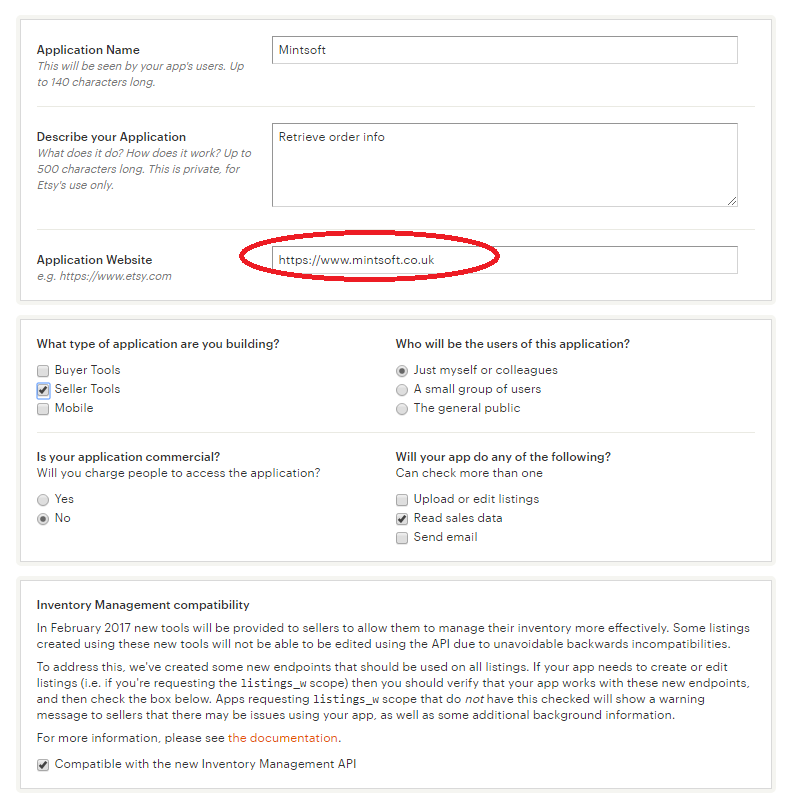
Click the option to read terms, accept them and click create APP.
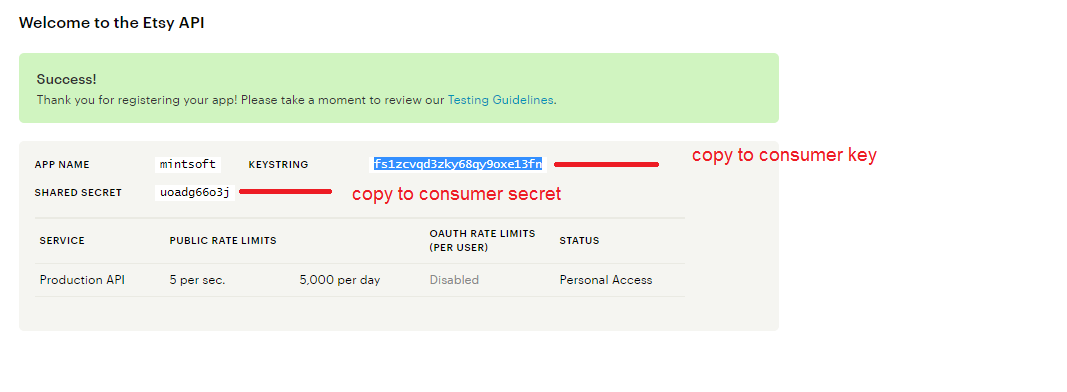
You will then be given the info to create the connection in OMS.
Mintsoft Connection Setup
Navigate to Connect > Overview > Etsy
Then copy the info over into the relevant fields:

Shop Name!
You will need to enter your store name exactly as it appears on your Etsy account in the ShopName field
Once you have made your selections for channel and stock sync, then click create.
You will now have the option to authorise the account:

You will then be taken to Etsy to authorise the account.

Once approved you will be returned to OMS.
Stock Sync
In order for stock sync to work for Etsy - product sync is required to be enabled so that we can retrieve the product IDS.
Shipping Mapping
Etsy uses the following shipping tags;
Standard Shipping
Tracked Next Day Delivery
1-3 Day International Delivery
Trouble-Shooting Orders have stopped importing
If you or your clients orders have stopped importing from Etsy for no reason, this is likely because you have not paid the Etsy selling invoice.
Please contact to pay the invoice - the integration will need to be setup again.
Trouble-Shooting Stock Not Updating in Etsy
In order for Mintsoft to be able to sync stock over it will need the product code and the listing ID. Mintsoft can only get active listings from Etsy - this is done by enabling Product Sync.
To check that the product has a listing ID in Mintsoft go to: Product > Overview > Actions/Edit > Alternative Codes.

If the product has this ID you will need to ensure that the product has a SKU and is listed as active in Etsy.
When a SKU in Mintsoft reaches zero, Etsy does not allow Mintsoft to update the stock in Etsy to zero.
The listing must be made inactive by the client.
When new stock is received in Mintsoft, the listing for that SKU must be made active in Etsy by the client.